roger DJ oddBeat
dB traktor
stems remover
v1.1.3 · free · formerly TSF
broken or unplayable stem track in Traktor Pro? strip the stray stem flags library manager left behind and turn it back into a normal, playable track.
download free
for Traktor Pro · macOS · apple silicon · notarized
Opening it the first time on macOS
macOS checks apps from outside the App Store on first launch. If you see “Apple could not verify… is free of malware”, don’t worry — the app is signed & notarized by Apple. To open it:
- Click Done — never “Move to Bin”.
- Open System Settings → Privacy & Security.
- Scroll down and click Open Anyway next to “dB traktor stems remover”, then confirm.
You only do this once — after that it opens like any other app.
you might know this as traktor stems fixer — same free tool, just an honest new name. it only ever removed stem metadata; it never “fixed” anything. the full, paid library-repair tool that restores stems (and the rest of the library manager→Traktor damage) is traktor library fixer.
what it does
🧹
strips the stem node
removes the <STEMS> block a track should never have had — the thing that makes Traktor treat a normal file as a stem deck.
🆗
clears the stem flag
unsets the stems bit in FLAGS and drops the RATING="STEM" marker, so nothing keeps re-flagging the track as a stem.
▶
back to a playable track
the result loads and plays like any other track. the only real fix when a stem is genuinely broken and won't play at all.
why this exists
some stems just won't play.
a bad export, a half-imported pack, a stem flag stuck on a regular file —
and Traktor refuses to load it.
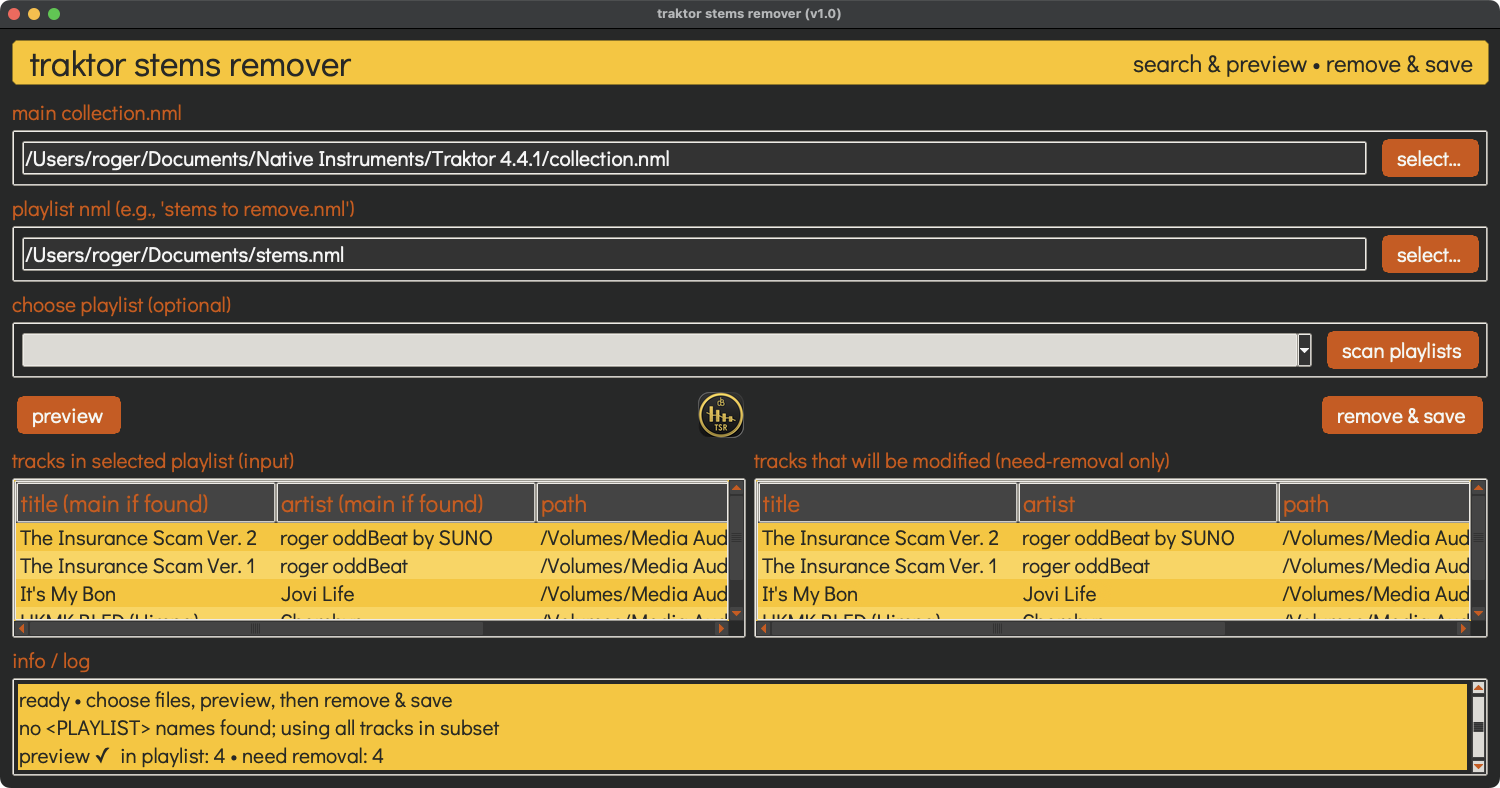
stems remover rips out the stem metadata so the track behaves like a normal file again. preview exactly what gets touched, then remove it in seconds — your original collection is never overwritten (it writes a .fixed.nml beside it).
three steps
1
select
point it at your main collection.nml and the playlist NML of stems you want stripped.
2
preview
see exactly which tracks carry stem metadata before anything changes.
3
remove & save
strip the stem flags and write a new .fixed.nml — original untouched.
it only edits the .nml
stems remover changes metadata only. it never touches, moves or deletes the actual stem audio files — they stay exactly where they are on disk.
if you want the stem audio gone too, delete it yourself from your Traktor Stems folder. on a default macOS setup that's usually:
~/Documents/Native Instruments/Traktor/Traktor Stems
not sure where yours is? Traktor shows the exact path in preferences → file management — you can change it there too.
want to keep your stems?

traktor library fixer
restores stems · 9€ · 7-day free trial
stems remover throws the stem data away. if your stems should work and library manager broke them, you want the opposite — TLF restores stem flags (and fixes the rest of the library manager→Traktor damage) on every sync.
about TLF →